Randall Field notes · South Texas
esc
Sousbook app icon

Live on the App Store · iOS 26 or later · Sousbook Pro required

Sousbook

Your recipes, ready when you cook. Bring website recipes, printed pages, photos and pasted text into one personal cookbook. Make a grocery list, adjust servings, and follow each step on iPhone — with ingredients beside directions on the wider iPhone Duo display.

What’s inside

01 · Collect

Save and scan your favorite recipes

Import supported website links, paste recipe text, enter your own recipes, or scan printed pages with your camera and photos. Multi-photo imports let a recipe span several pages. Review the text before saving.

02 · Cook

A cookbook that fits iPhone Duo

Our first app with iPhone Duo support puts ingredients beside cooking steps on the wider display. Compact layouts work on standard iPhones and the cover display. Adjust servings, switch US and metric units, and use cooking timers.

03 · Shop

From recipe to grocery list

Turn ingredients into a grocery list organized by aisle. Saved recipes are available offline, so your personal recipe book stays useful without a connection. Website imports, iCloud sync and purchases need internet access.

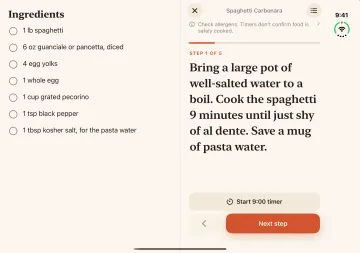
Sousbook cooking mode in the iPhone Duo simulator with an ingredient checklist beside the current direction
iPhone Duo simulator capture with illustrative sample recipes. Sousbook Pro required. Physical Duo testing is a separate milestone.

Pricing

Try the sample introduction. Sousbook is free to download. Your own cookbook and cooking features require Sousbook Pro after the interactive sample introduction.

Annual or lifetime. Choose an annual auto-renewing subscription or a one-time lifetime purchase. Current localized prices and any trial eligibility are shown in the app and Apple’s purchase confirmation.

Questions

Does Sousbook support iPhone Duo?

Yes. Sousbook is our first app with iPhone Duo support, with expanded layouts for the inner display and compact layouts for the cover display. The screenshots here were captured in Apple’s simulator, rather than on physical Duo hardware.

Can I scan printed recipes into my iPhone?

Yes. Use the camera or select photos, including multiple pages. Review ingredients, quantities and directions against the original before saving. Optional scan cleanup requires a supported device with Apple Intelligence available.

Can I save recipes from websites, TikTok or Instagram?

Supported website links can be imported. For social posts, share the link, use text supplied by the sharing app, paste a caption or read a screenshot, then review the recipe. Social posts are not fetched automatically and video transcription is not included.

Can I read my recipe book offline?

Yes. Saved recipes are stored on your device and can be read offline. Website imports, iCloud sync, purchases and restoration require a connection. No separate Sousbook account is required.

Does Sousbook come with a recipe collection?

Your personal cookbook starts empty. The introduction and screenshots use illustrative sample recipes; Sousbook helps you collect and organize recipes you choose to add.