How to Organize Recipes Into a Digital Recipe Book
Screenshots, bookmarks, recipe cards and TikTok saves, all in one place. A step-by-step way to organize your recipes into a digital recipe book you'll actually use.
On this page
Everyone’s recipe collection looks about the same: 80 screenshots, a few dozen bookmarks, saved TikToks and Instagram posts, a stained index card in a drawer, and one recipe you only know because your mom texted it to you in 2019.
Here’s how to turn all of that into a digital recipe book you’ll actually cook from. It’s timely, too. Thanksgiving is next week, and this is the week everyone goes hunting for “the stuffing recipe.”
1. Pick one home
This is the step that matters most. A notes app, a shared Google Doc, a spreadsheet, or a recipe app can all work. What doesn’t work is three of them. If you have to remember where a recipe lives, you’ll end up searching the internet for it again.
What to look for in that home:
- It can import from links so you’re not retyping.
- It works offline in the kitchen.
- It searches by name and ingredient.
- It syncs to your other devices, or is easy to share with family.
2. Gather everything first
Before you organize anything, collect it all in one pass:
- Phone screenshots and photo albums
- Browser bookmarks
- Saved posts on TikTok, Instagram, Pinterest, and YouTube
- Emails and texts with recipes in them
- Recipe cards, printouts, and the cookbooks with sticky notes
3. Keep only what you’ll make
Be honest. Keep recipes you’ve made and liked, and ones you’ll make in the next few months. A hundred recipes you use beats a thousand you scroll past.
4. Use the same format for every recipe
Each recipe gets the same parts, in the same order:
- Title
- Servings and total time
- Ingredients, with amounts
- Steps, numbered
- Source, the link or the person
- Your notes
Social posts and screenshots often leave out amounts or bury them in a caption. Copy the real ingredient list into the recipe, and keep the link as the source.
5. A few categories, lots of tags
Keep top-level categories few and obvious: breakfast, mains, sides, soups, baking, desserts, drinks. Then use tags for everything else: weeknight, holiday, freezer-friendly, kid favorite, Grandma’s. Tags let one recipe live in several places without duplicates.
6. Digitize the family recipe cards
These are the recipes worth the most effort, and the ones most at risk.
- Photograph each card flat in daylight, without flash. Get the back too.
- Type or scan the text into your recipe book.
- Keep the photo of the original next to the typed version. The handwriting is part of the recipe.
- Write down whose recipe it was.
- Translate the vague parts while someone can still answer: “a moderate oven,” “butter the size of an egg,” “cook until done.”
If the card is in old cursive that’s hard to read, I wrote a guide to reading old handwritten cursive.
7. Add notes every time you cook
The best recipe books have margins full of notes: “use less salt,” “double the sauce,” “bake 5 minutes longer in our oven.” A digital book should have them too. Add a note the day you cook, while you remember.
How Sousbook helps
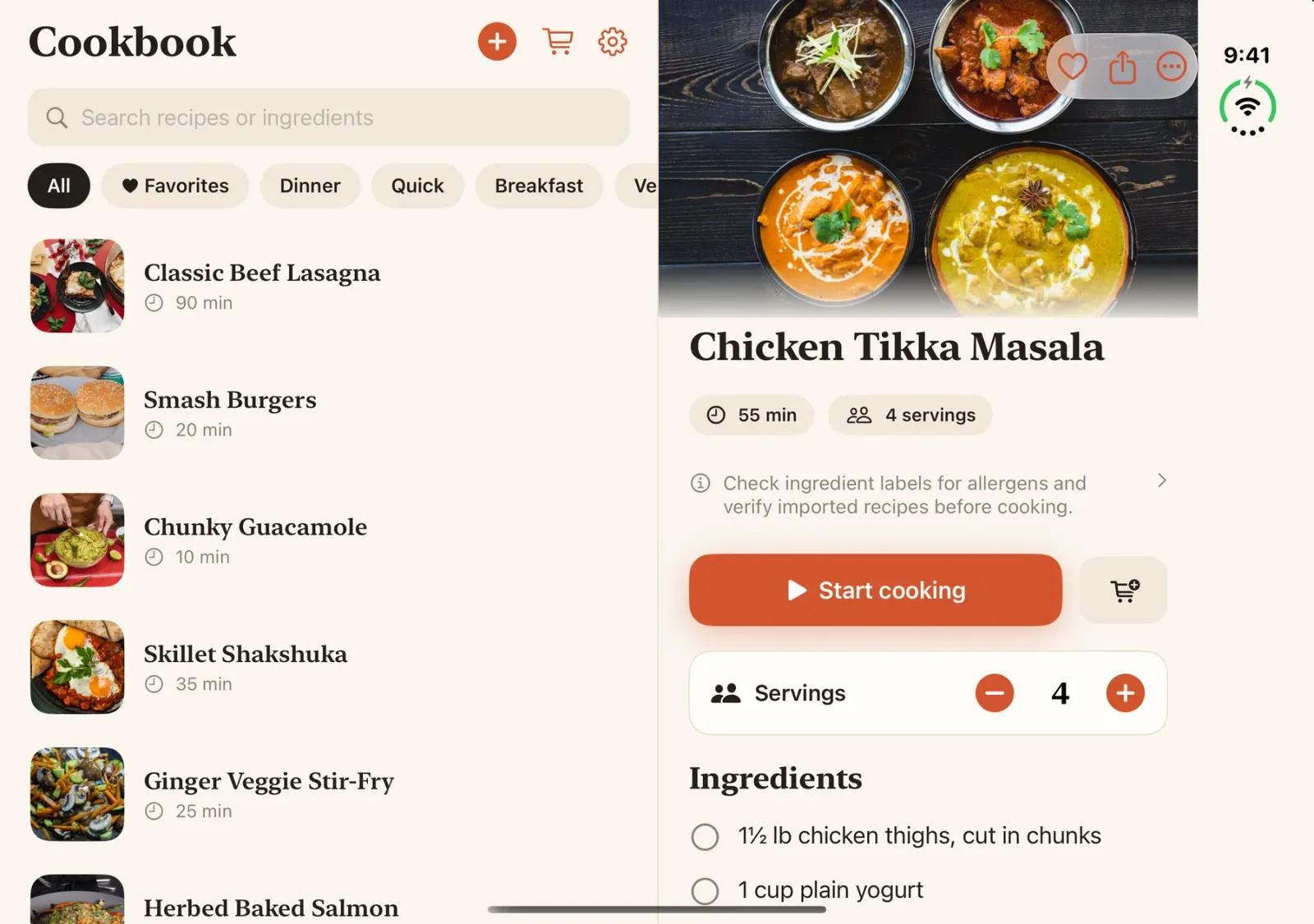
I built Sousbook because my own recipes were spread across every app on my phone. It brings recipes from websites, photos, printed pages, and pasted text into one personal cookbook.
- Import from supported website links, or share a recipe straight from Safari, TikTok, or Instagram, then review it before saving.
- Scan printed recipes and cards with your camera. On supported devices with Apple Intelligence, it can help clean up the scanned text, and you review the changes before they’re applied.
- Keep source links and personal notes with every recipe.
- Scale servings and switch between US and metric units.
- Turn ingredients into a grocery list organized by aisle.
- Cook step by step, with timers on your Lock Screen and the screen kept awake.
Your cookbook works offline and can sync through your private iCloud account. There’s no Sousbook account to create. It’s especially nice on iPhone Duo, where the recipe and cooking steps sit side by side.
Sousbook is a paid app, with an annual subscription or a one-time lifetime purchase, and eligible new users get a 3-day free trial.
Download Sousbook on the App Store · Learn more about Sousbook
Quick answers
What is the best way to organize recipes?
Put every recipe in one place, sort them into a few broad categories such as by meal or main ingredient, add tags for things like weeknight or holiday, and use the same format for each recipe. The tool matters less than having only one.
How do I make a digital recipe book?
Gather recipes from screenshots, bookmarks, social media saves and paper cards. Choose one app or document as the home. Import or type each recipe in a consistent format, scan paper recipes, group them into categories with tags, and add your own notes after you cook.
How do you organize recipes from screenshots and social media?
Save the source link and the recipe text together. Screenshots and saved posts get lost and don't always include the ingredients, so copy the ingredient list and steps into your recipe book and keep the link to the original as the source.
How do I digitize old family recipe cards?
Photograph each card flat in daylight without flash, front and back. Type or scan the text into your recipe book, keep the photo of the original card with it, and write down whose recipe it was. Add notes for anything vague like a pinch or a moderate oven.
What categories should I use for recipes?
Keep top-level categories few and obvious: breakfast, mains, sides, soups, baking, desserts, drinks. Use tags for everything else, such as weeknight, holiday, freezer friendly, or Grandma's.