How to Digitize Old Family Letters With Your iPhone
Use Apple Notes on your iPhone to scan old family letters and envelopes into PDFs, name each file, and save a searchable transcript of hard-to-read cursive.
On this page
If you have a box of family letters and an iPhone, start with one letter that still has its envelope. Open Notes, create a note, tap the Attachments button, and choose Scan Documents. You can save the envelope and every page together in a single PDF. The address, the postmark, and the signature will help you give that PDF a better name than “Scanned Document.”
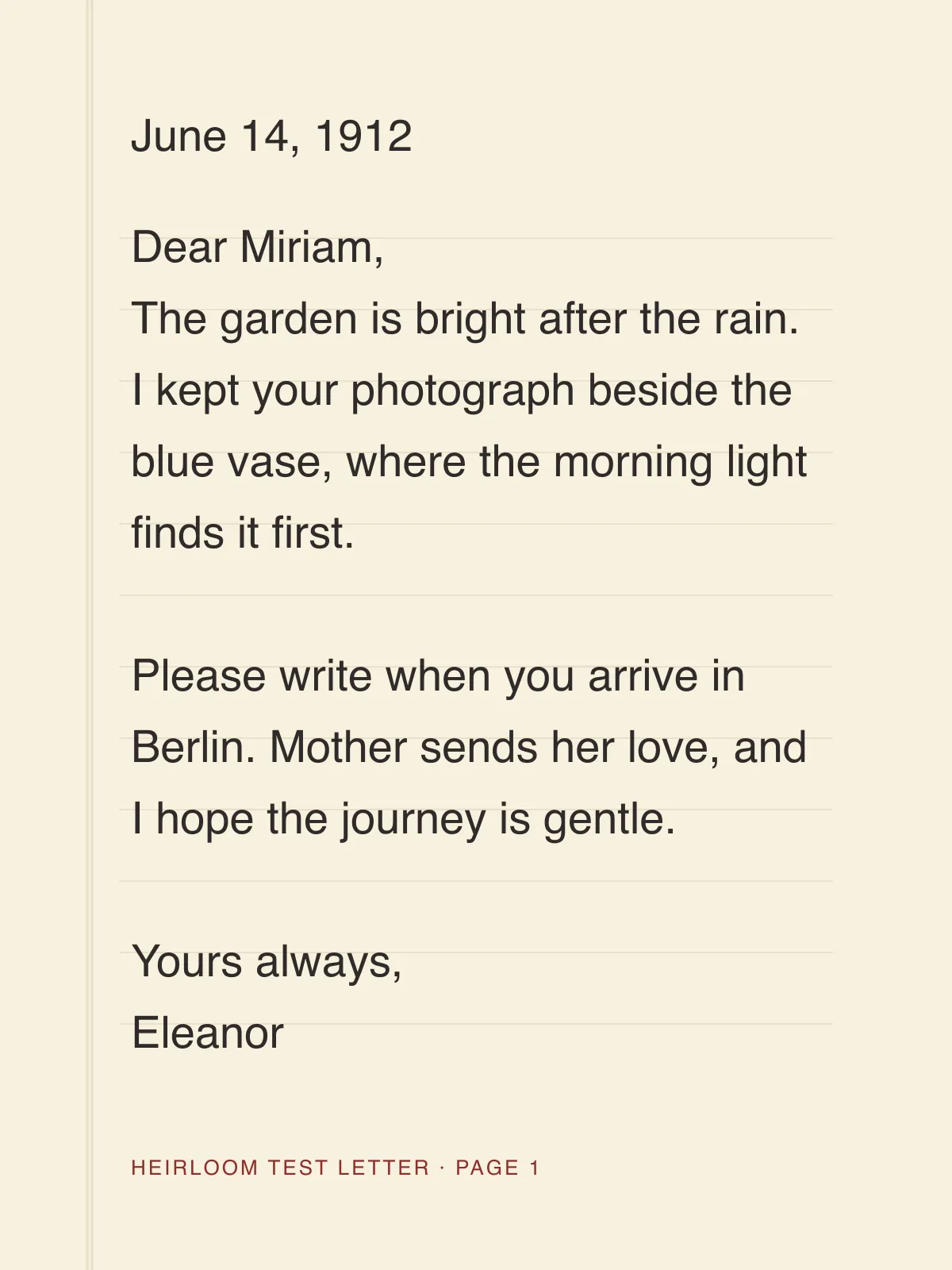
I build Heirloom, an app for reading old handwriting. One of the letters I use to test it has a detail I love for this job. Eleanor asks Miriam to write when she arrives in Berlin. Crop the greeting and the signature out of that scan and you still have a lovely sentence, but now you have to guess who wrote it and who was going to Berlin.
Scan the envelope and pages into one PDF
- Start with the envelope. Capture the front, then the back if there’s a return address, a note, or another postmark. A postmark gives you a mailing date. The writer may have dated the letter a few days earlier.
- Capture each written side in reading order. Lay it on a plain surface in even light and hold the phone parallel to the page. If a fold resists opening, photograph what you can see without pressing it flat. Turn the last sheet over, too. That’s an easy place to miss a postscript.
- Check the crop while the letter is in front of you. Tap the scan thumbnail and zoom in on the faintest line. Check the top date, the ends of the longest lines, and the signature. If the automatic crop cut off pencil marks in a margin, adjust the corners or retake that page. Keep the scan in color if a filter makes the pencil disappear.
- Finish the scan and save a copy. Once all pages are captured, finish scanning. Open the PDF attachment in the note, tap Share, and choose Save to Files. Pick a folder such as
Family Lettersand give the file a name before starting the next letter. Apple’s illustrated guide to scanning in Notes
Give the scan a name someone else can find
I’d file the sample below as 1912-06-14_Eleanor-to-Miriam.pdf. You can get all three pieces of that filename from the page. Berlin is tempting to add as the place of writing, but read the line again. It tells us where Miriam is headed. Where Eleanor sat down to write is still an open question.
Use as much of the pattern as the letter supports. If it says only “June 1912,” use 1912-06_Eleanor-to-Miriam.pdf. If there’s no date, undated_Eleanor-to-Miriam_01.pdf is enough. If a relative later identifies Miriam’s married name or recognizes the address, save their name and explanation in a note alongside the PDF. A cousin looking through the folder in ten years will want to know where that identification came from.
Make hard-to-read cursive easier to share
A scan keeps the shape of the handwriting. A transcript lets someone search for “Miriam” or read the letter aloud to a relative. I’d keep both files together, with the same name and a different extension. A plain .txt file is enough for the transcript.
For a short letter, start by typing the words you can read. If a surname stumps you, look for the same capital letter in the greeting or another familiar word on the page. Keep the writer’s spelling and put [illegible] wherever you’re still unsure. That gives the next person a specific gap to help with. National Archives transcription tips
If you’d like a first pass at the handwriting, my iPhone app can transcribe a photo and keep the original page beside the result. I’d check the names, dates, and places first. A wrong name can sound perfectly natural when you read the sentence aloud. Heirloom for iPhone
Make sure the family can open it
Before moving on to the rest of the box, send one finished PDF to someone in the family. Ask whether they can open it, zoom in on the signature, and read the postscript. If one of those fails, it’s a lot easier to rescan one letter than forty.
Keep the paper original with its envelope. For the digital files, the National Archives recommends three copies on two types of storage, with one copy kept elsewhere. A practical setup is a folder on your computer, a backup on an external drive, and a separate copy with a relative. Send the transcript with the scan. Even someone who can read every word may still want to see how Eleanor signed her name. National Archives guide to digitizing family papers