"No Hot Water": How to Track Maintenance Requests So Nothing Gets Lost
A simple way to log, prioritize and follow up on rental repairs, from the first tenant text to the paid invoice.
The text arrives at 7 a.m.: no hot water. You say you’ll call someone. Then your day happens.
Maintenance requests are easy to lose track of when they arrive by text, in passing, or in the middle of something else.
What a good request record has
- What’s wrong, and where. Property, unit, short description.
- Priority. An emergency and a squeaky door shouldn’t wait in the same line.
- Status. Open, scheduled, in progress, done.
- Who’s assigned. The vendor you called.
- How long it’s been open. The easiest way to spot something slipping.
- What it cost.
How Rental Manager helps
The Maintenance screen collects all of that. Each request carries a priority and status, the vendor you assigned, and how many days it has been open. Anything open longer than its priority should allow rises into a Needs Attention section, so the emergency doesn’t hide under a to-do you can wait on.
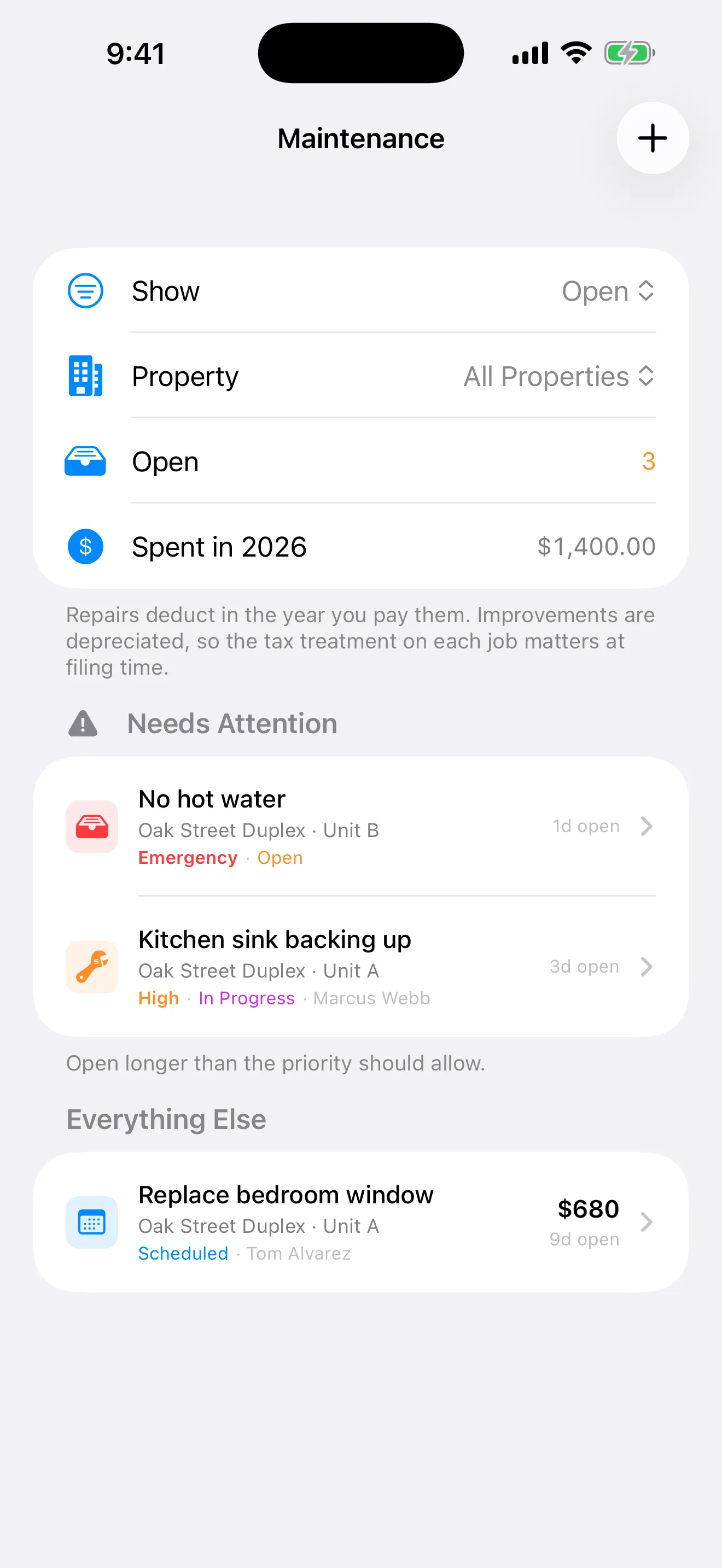
Demo data.
You can filter by property and see how much you’ve spent on repairs this year. Keep the details and supporting records for each job. Check with a tax professional about whether a specific job is a repair or an improvement and how it should be treated.
Make it a habit
Log the request the moment you hear about it, even before you’ve called anyone. A short record gives you something concrete to follow up on.