Where Did This Year's Numbers Go? How to Fill Out Schedule E for a Rental Property
A plain-English walkthrough of Schedule E Part I for landlords: which numbers go on which line, what trips people up, and how to have them ready before tax season.
On this page
The hardest part of Schedule E isn’t the form. It’s finding twelve months of rent and receipts when you finally sit down to fill it out.
If you own a rental property, Schedule E is the IRS form where your rent and expenses for the year end up. The first time you see it, it looks like a wall of numbered lines. Once you know what each line wants, it’s mostly copying totals you should already have.
This guide covers Part I, the section for rental real estate. It’s written for self-managing landlords with a few properties, and it’s not tax advice. Tax situations vary, so check your numbers with a tax professional before you file.
Who files Schedule E
You generally use Schedule E (Form 1040) to report income and expenses from rental real estate you own. It’s filed with your Form 1040, so it’s due when your individual return is due, usually mid-April.
If you provide substantial services to tenants, as a hotel or some short-term rentals do, the income may belong on Schedule C instead. That’s worth asking a professional about.
The top of Part I
Questions A and B ask whether you made payments during the year that would require you to file Forms 1099, and if so whether you did. Whether a landlord has to file 1099s depends on whether the rental counts as a trade or business, so ask your preparer.
Line 1a is the property’s street address. Each property gets its own column (A, B or C). If you have more than three, attach another Schedule E page.
Line 1b is the type of property, entered as a code. For example, 1 is single-family residence and 2 is multi-family residence.
Line 2 asks for fair rental days and personal use days. If you or your family used the property personally for part of the year, it changes how expenses are split. This is the vacation-home situation. A long-term rental you never stay in will show 365 rental days and 0 personal days.
Income: line 3
Line 3, rents received. Total rent collected for the property during the year. This includes:
- regular monthly rent
- advance rent, in the year you receive it
- fees a tenant pays you, like late fees
- a security deposit you keep, in the year you keep it
A security deposit you plan to return isn’t income when you collect it.
Expenses: lines 5 through 19
Each expense line maps to a category. If your records are sorted into these categories all year, this part takes minutes.
| Line | What goes here |
|---|---|
| 5 Advertising | Listing fees, signs, ads for vacancies |
| 6 Auto and travel | Driving to the property for rental business (mileage or actual costs) |
| 7 Cleaning and maintenance | Routine upkeep: cleaning, lawn care, pest control, filter changes |
| 8 Commissions | Leasing commissions paid to find tenants |
| 9 Insurance | Landlord and liability policies for the property |
| 10 Legal and other professional fees | Attorney fees, the rental portion of tax prep |
| 11 Management fees | Property manager fees |
| 12 Mortgage interest paid to banks | Interest from your Form 1098 (interest only, not principal) |
| 13 Other interest | Interest on other loans used for the rental |
| 14 Repairs | Fixing something that broke, back to how it was |
| 15 Supplies | Small items used for the rental |
| 16 Taxes | Property taxes |
| 17 Utilities | Utilities you pay, not the ones the tenant pays |
| 18 Depreciation expense or depletion | The yearly deduction for the building and improvements |
| 19 Other | Anything that fits nowhere else, like HOA dues (list it) |
Line 20 adds lines 5 through 19.
Not sure what counts? Keep the receipt and the category, and let your preparer make the call on anything borderline.
The lines that trip people up
Mortgage payments vs. mortgage interest. Only the interest goes on line 12. The principal part of your payment builds equity and isn’t deductible. Your lender’s Form 1098 shows the interest.
Depreciation (line 18). You don’t deduct what you paid for a rental house in the year you buy it. Residential rental buildings are generally depreciated over 27.5 years, and the land isn’t depreciated at all. The calculation goes on Form 4562 in the year the property is placed in service, and the yearly amount lands on line 18. Many landlords leave this line blank by mistake. That’s an expensive mistake.
Repairs vs. improvements. Fixing a leaking faucet is a repair (line 14). A new roof or a kitchen remodel is usually an improvement, which gets depreciated over time instead of deducted all at once. The line between them has specific IRS rules, so this is a good question for your tax preparer.
The bottom of Part I: lines 21 and 22
Line 21 is income minus expenses for that property: line 3 minus line 20. It can be a loss.
Line 22 is the deductible part of a loss. Rental losses are generally passive, and the passive activity rules (Form 8582) can limit how much loss you can deduct this year. Many landlords who actively participate can deduct up to $25,000 of rental losses, phased out at higher incomes. Your preparer or tax software handles this calculation. Your job is to bring accurate totals.
From there, the totals across properties flow to lines 23 through 26 and on to your 1040 (through Schedule 1).
Get the totals ready before January
The hard part of Schedule E isn’t the form. It’s having twelve months of rent and expenses sorted by property and category. If you start that in March, you’re rebuilding the year from bank statements.
How Rental Manager helps
Rental Manager is an iPhone app for landlords who manage their own properties. Its Schedule E screen arranges what you’ve recorded by tax year and property, with each total on its matching line number. Rents go on line 3. Each expense category maps to its line, and depreciation goes on line 18.
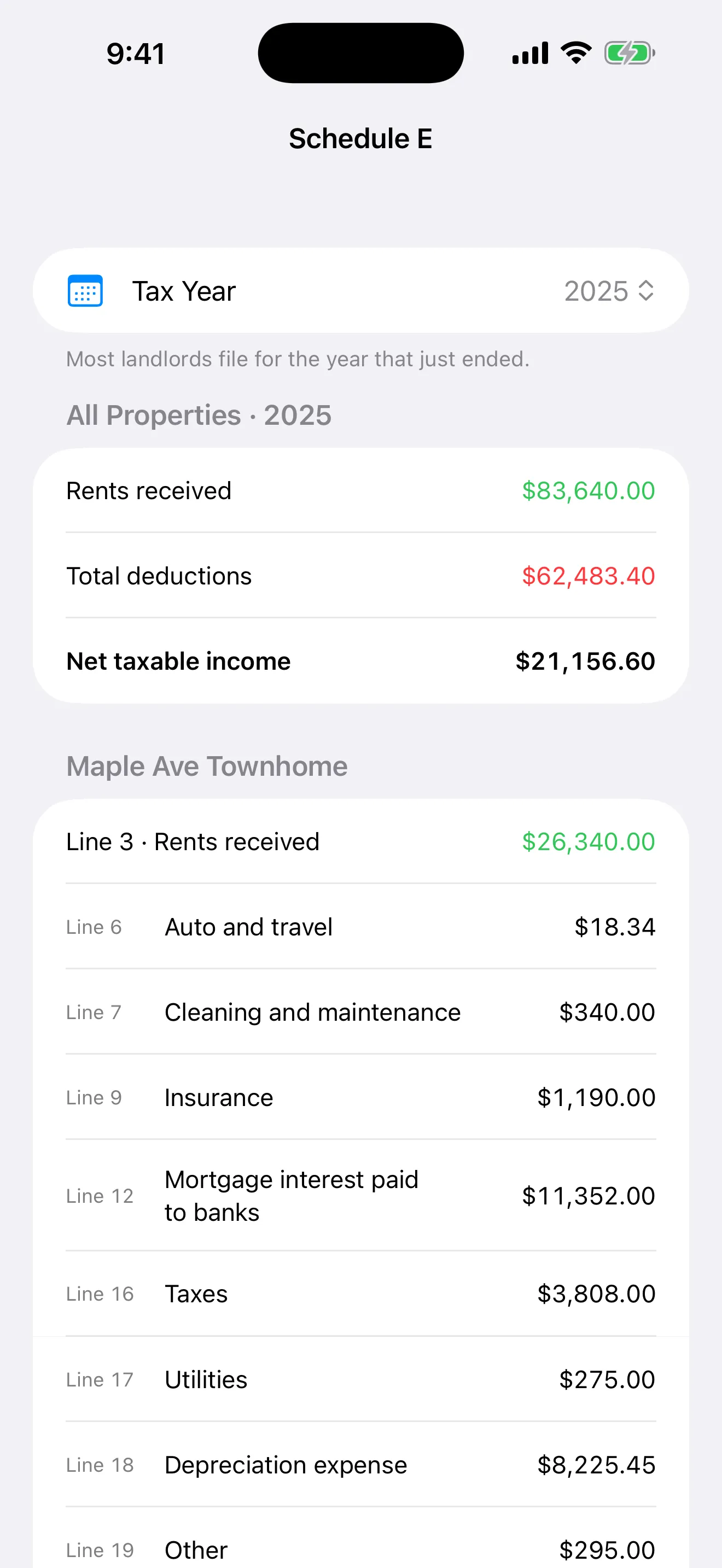
Demo data.
Capital improvements are kept off the expense lines, and mortgage principal is kept apart from interest. That way the totals don’t overstate your deductions. It’s an organizing tool: it doesn’t file your return or give tax advice. It gives you clean numbers to hand to whoever does.
If you’re starting fresh, log expenses as they happen and the Schedule E view fills itself in.